Project
PHQ-9 DSM-5 Based Mental Health Predictor
A machine learning pipeline for real-time data processing and anomaly detection.
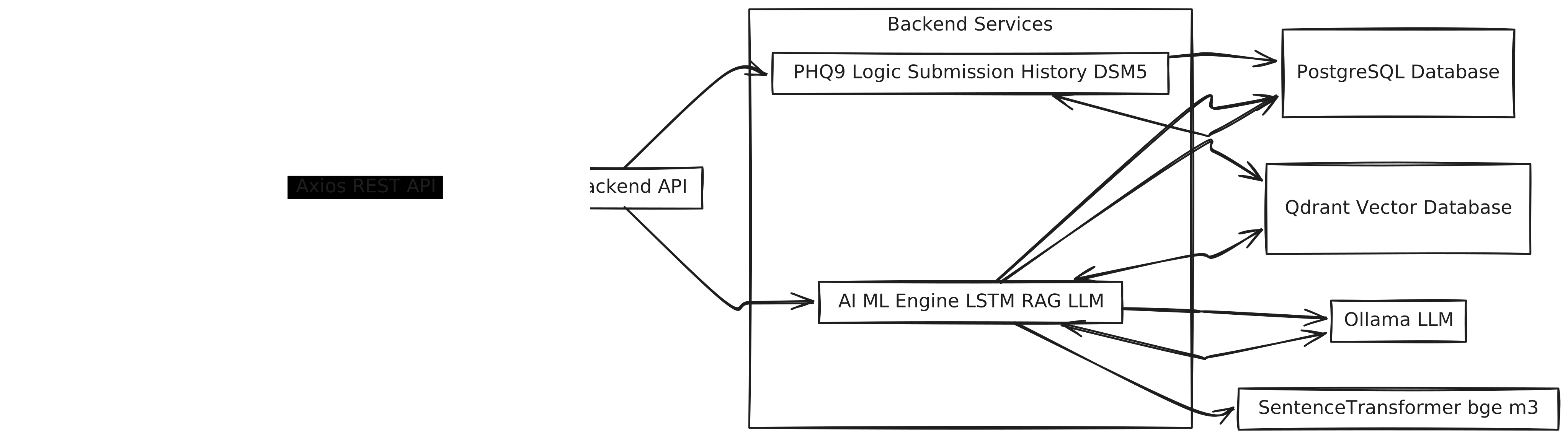
🧠 PHQ-9 AI-Powered Medical Consultation System
A full-stack mental health consultation platform integrating PHQ-9 depression screening, AI-driven predictions, and LLM-based interventions.
It enables patients to self-assess depressive symptoms and allows doctors to analyze patient progress, visualize trends, and receive AI-generated recommendations.
🏗️ System Architecture
This project is composed of two main repositories:
| Component | Tech Stack | Repository | |------------|-------------|-------------| | 🖥️ Frontend | React 18 + Vite + Tailwind CSS + Recharts + Axios | phq9-frontend | | ⚙️ Backend | Flask + PostgreSQL + SQLAlchemy + bcrypt + ML/AI | phq9-backend |
Architecture Overview
[ Patient / Doctor UI (React) ]
|
|  Axios (REST API)
v
[ Flask Backend (API + ML + AI) ]
|
|  SQLAlchemy ORM + Qdrant (Vector DB)
v
[ PostgreSQL + Local Models + Embeddings ]
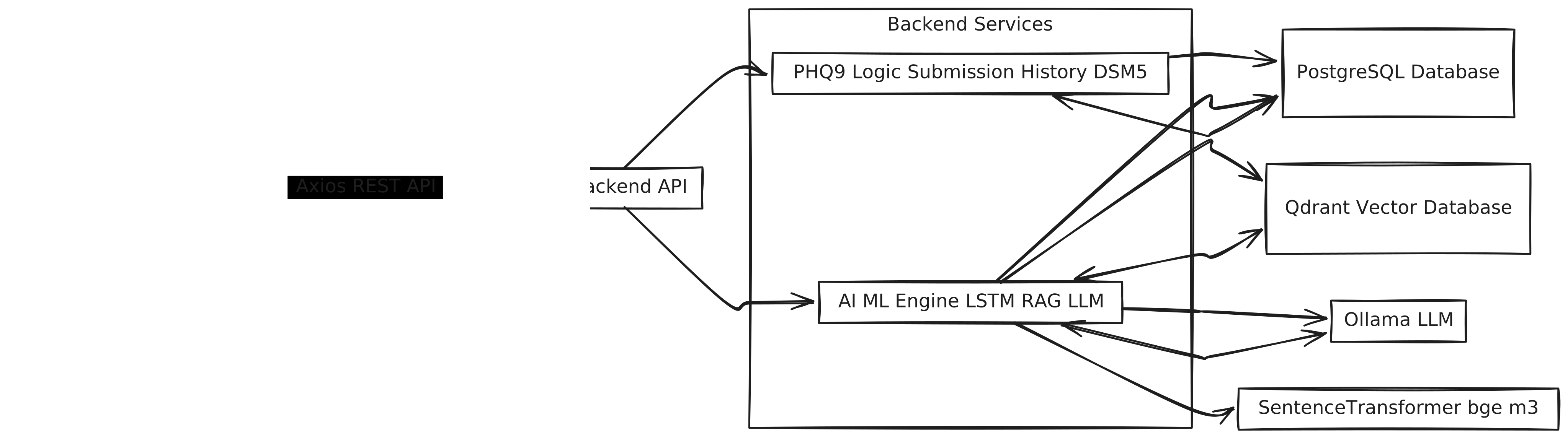
🚀 Key Features
🧍♂️ Patient Portal
- Secure registration and login
- Daily PHQ-9 consultation submission
- Submission history and score tracking
- Optional notes for patient reflection
👨⚕️ Doctor Portal
- Dashboard showing all patient submissions
- Consultation history with PHQ-9 and DSM-5 details
- Editable doctor notes
- AI-generated predictions (future PHQ-9 scores)
- AI-generated markdown interventions (LLM summaries)
- Line chart visualization of score trends
🤖 AI, ML & Vector Intelligence
- LSTM Timeline Predictor: Predicts future PHQ-9 scores and potential relapses.
- Intervention Generator (LLM): Generates natural-language advice using context-aware retrieval.
- Qdrant Vector DB: Stores past interventions and embeddings for semantic retrieval.
- SentenceTransformer Embeddings: Uses
BAAI/bge-m3to create vector representations of intervention content. - RAG (Retrieval-Augmented Generation): Combines contextual retrieval from Qdrant with local LLM inference via Ollama (e.g.,
phi3,llama3). - Data Processing Pipeline: Includes feature normalization, correlation analysis, TF-IDF keyword extraction, and sentiment computation.
🧩 Tech Stack Summary
| Layer | Technology | Purpose |
|-------|-------------|---------|
| Frontend | React 18, Vite, Tailwind CSS 4, Recharts, Axios | UI and visualization |
| Backend | Flask, SQLAlchemy, bcrypt, Flask-CORS | API & data management |
| Database | PostgreSQL | Persistent data storage |
| Machine Learning | TensorFlow / scikit-learn (LSTM) | Timeline & score prediction |
| AI Model | Ollama (Phi-3 / LLaMA-3 local model) | Contextual intervention generation |
| Vector Database | Qdrant | Semantic search & retrieval |
| Embeddings | SentenceTransformer (BAAI/bge-m3) | Text vectorization for RAG |
⚙️ Setup Instructions
1. Backend Setup
cd phq9-backend
python -m venv venv
venv\Scripts\activate        # (Windows)
# or source venv/bin/activate (Linux/macOS)
pip install -r requirements.txt
python app.py
Backend runs on http://localhost:5000
Additional Backend Dependencies
Make sure these services are available:
- PostgreSQL → stores user data and PHQ-9 results
- Qdrant → vector DB for semantic retrieval
- Ollama → local LLM inference server
Example Ollama setup:
ollama pull phi3
ollama serve
2. Frontend Setup
cd phq9-frontend
npm install
npm run dev
Frontend runs on http://localhost:5173
Set API base URL in .env:
VITE_API_BASE_URL=http://localhost:5000/api
🔌 API Overview
| Endpoint | Method | Description |
| -------------------------------- | ------ | ------------------------------------ |
| /api/register | POST | Register new user |
| /api/login | POST | Login user |
| /api/phq9/questions | GET | Fetch PHQ-9 questions |
| /api/phq9/submit | POST | Submit consultation |
| /api/phq9/history?user_id={id} | GET | Fetch consultation history |
| /api/predictions/{userId} | GET | Fetch AI predictions & interventions |
| /phq9/train-model | GET | Train ML model manually |
💻 Running the Full Stack
- Start PostgreSQL, Qdrant, and Ollama
- Run Flask backend
- Run Vite frontend
- Open http://localhost:5173
- Register or login as a patient
- Submit a PHQ-9 assessment
- Login as Doctor (
rajeev/rajeev) to view analytics, predictions, and AI interventions
📊 Example Dashboard Layout
-
Top Section: AI-generated markdown intervention (full-width card)
-
Bottom Section:
- Left (70%): Line graph of PHQ-9 trends
- Right (30%): Scrollable consultation history cards
-
Color Legend:
- 🟢 Green line: Actual (non-predicted) PHQ-9 scores
- 🔵 Blue line: Predicted PHQ-9 scores
🧱 Database Schema (Simplified)
user
 ├─ id (PK)
 ├─ username
 ├─ emailid
 ├─ password (hashed)
 ├─ role ('patient' | 'doctor')

phq9_assessment
 ├─ id (PK)
 ├─ user_id (FK)
 ├─ phq9_total_score
 ├─ patients_notes
 ├─ doctor_notes
 ├─ created_at

dsm_5_assessment
 ├─ id (PK)
 ├─ phq9_assessment_id (FK)
 ├─ dsm5_mdd_assessment_enc
 ├─ relapse

interventions
 ├─ id (PK)
 ├─ user_id (FK)
 ├─ intervention (Markdown)
 ├─ embedding (Vector)
 ├─ created_at
🧠 ML & AI Flow
-
Data Cleaning:
extract_clean_data.pyprepares input data, computes correlations, sentiment, and statistical features. -
Model Training:
train_timeline_predection.pytrains an LSTM on sequential PHQ-9 scores to predict future values. -
AI Intervention Generation:
interventions.py:- Embeds historical interventions using
SentenceTransformer (BAAI/bge-m3). - Stores vectors in Qdrant.
- Retrieves relevant contexts for the current patient.
- Sends combined context + summary prompt to Ollama (LLM).
- Returns generated markdown to frontend.
- Embeds historical interventions using
🧪 Development Tips
- Run backend first to avoid CORS issues
- Monitor Ollama logs for prompt latency
- Use
ngrokfor external backend access - Clear
localStorageif auth issues occur - Test responsiveness using browser dev tools
🔐 Security & Privacy
- Passwords hashed via bcrypt
- CORS restricted to frontend origin
- HTTPS recommended for deployment
- Data anonymized before ML training
- Strictly for educational and research use — not clinical deployment
📜 License
MIT License — Copyright © 2025 Developers: Manideep & Rajeev
🙌 Contributors
- Manideep — Data Science, Backend, ML/AI Pipeline
- Rajeev — Frontend, Dashboard Design, Integration
Disclaimer: This project is an educational prototype integrating PHQ-9 assessment with AI-assisted analysis. It is not intended for medical diagnosis or treatment.